
Email Signatures
Make your email signature a powerful networking tool by linking to your digital business card or portfolio.
Create Your QR CodeThe Interactive Handshake
Every email you send is a networking opportunity. A QR code in your email signature transforms it from a static block of text into an interactive call-to-action.
It provides a one-scan way for recipients to get all your information. Instead of just seeing your name and title, they can instantly save your full contact details, visit your website, or connect with you on LinkedIn.
Key Use Cases
Digital Business Card (vCard)
Generate a QR code that, when scanned, creates a new contact on the user's phone with all your details pre-filled.
Link to Portfolio or Website
Showcase your work by linking your signature's QR code to your online portfolio, personal blog, or company website.
Book a Meeting
Direct recipients to your Calendly, SavvyCal, or other scheduling link to easily book a meeting with you.
Promote Your Latest Content
Use a dynamic QR code to link to your latest blog post, YouTube video, or podcast episode, and update it regularly.
Real-World Examples

Salesperson's Signature
A QR code links to a landing page where the recipient can book a demo of the product.
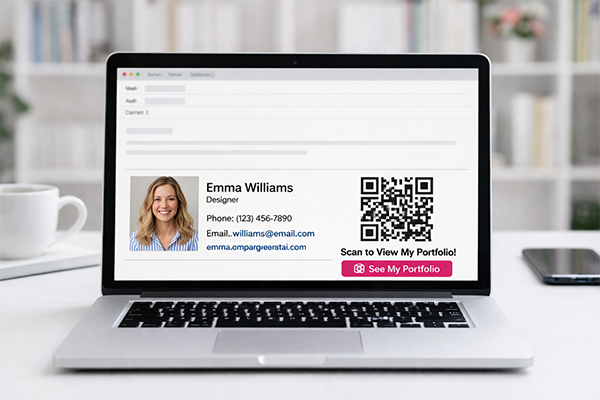
Designer's Signature
The QR code takes the recipient to the designer's Behance or Dribbble portfolio to see their latest work.
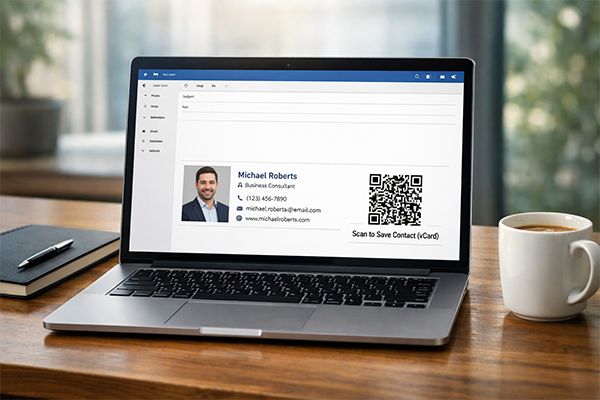
Consultant's Signature
A vCard QR code allows potential clients reading the email on their desktop to instantly save the consultant's contact details to their phone.
Benefits for Brands
- Turn Every Email into a Lead Generation Tool
- Make It Effortless for People to Save Your Contact Info
- Drive Traffic to Your Most Important Content
- Present a Modern and Tech-Savvy Professional Image
Benefits for Customers
- One-Scan Contact Saving
- Easy Access to Your Portfolio, Website, or Calendar
- A Memorable and Convenient Interaction
Design & Placement Guidelines
Keep the QR code small but scannable. A size of 90x90 to 120x120 pixels usually works well.
Don't add too much other imagery to your signature, which could cause the email to be flagged as spam.
Ensure there's a small amount of white space (quiet zone) around the QR code.
Always test your signature by sending an email to yourself and scanning the code on both desktop and mobile email clients.
Frequently Asked Questions
Ready to Innovate?
Join thousands of brands connecting with customers through smart packaging. Create your dynamic QR code now.
Get Started with OrbitQR