
Blogs
Grow your readership by making it easy to share and access your blog content from anywhere.
Create Your QR CodeConnecting Print to Post
QR codes make it incredibly easy to bridge your offline presence with your online content, driving new readers to your blog from physical materials.
They serve as a direct portal to your articles. Instead of a potential reader having to remember your blog's name and search for it later, a quick scan can take them directly to your latest post, a specific category, or your subscription page.
Key Use Cases
Link from Author Bio
If you're a guest author in a magazine or book, include a QR code in your bio that links to your personal blog.
Promote on Presentation Slides
End your talk with a QR code on the final slide that says, 'Scan to read more on this topic on my blog'.
Add to Business Cards
Establish your expertise by putting a QR code on your business card that links to your most popular blog post.
Stickers and Merchandise
Create stickers with your blog's logo and a QR code that fans can put on their laptops, driving organic traffic.
Real-World Examples
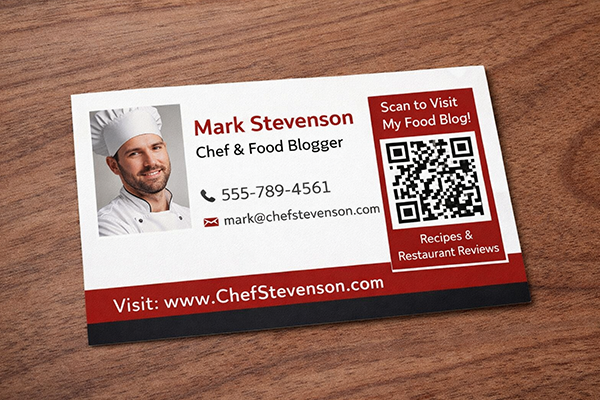
Chef's Business Card
A chef's business card includes a QR code that links to his food blog with recipes and restaurant reviews.

Conference Speaker
A speaker at a marketing conference ends their presentation with a QR code linking to a detailed blog post that expands on their talk.

Book Author
The 'About the Author' page in a book has a QR code that directs readers to the author's blog for updates and new content.
Benefits for Brands
- Seamlessly Drive Offline Audiences to Your Blog
- Increase Subscribers and Regular Readership
- Establish Authority and Thought Leadership in Your Niche
- Track Which Physical Channels Drive the Most Blog Traffic
Benefits for Customers
- Instant Access to In-depth Articles and Content
- Easy Way to Follow and Subscribe to Favorite Bloggers
- Discover New Content from Offline Sources
Design & Placement Guidelines
Use a clear call-to-action like 'Scan to Read My Blog' or 'Get More Info Here'.
If linking to a specific article, consider making the CTA relevant to that article's title.
Customize your QR code with your blog's color scheme and logo to make it recognizable.
Ensure the blog is mobile-friendly, as all traffic from the QR code will be on mobile devices.
Frequently Asked Questions
Ready to Innovate?
Join thousands of brands connecting with customers through smart packaging. Create your dynamic QR code now.
Get Started with OrbitQR